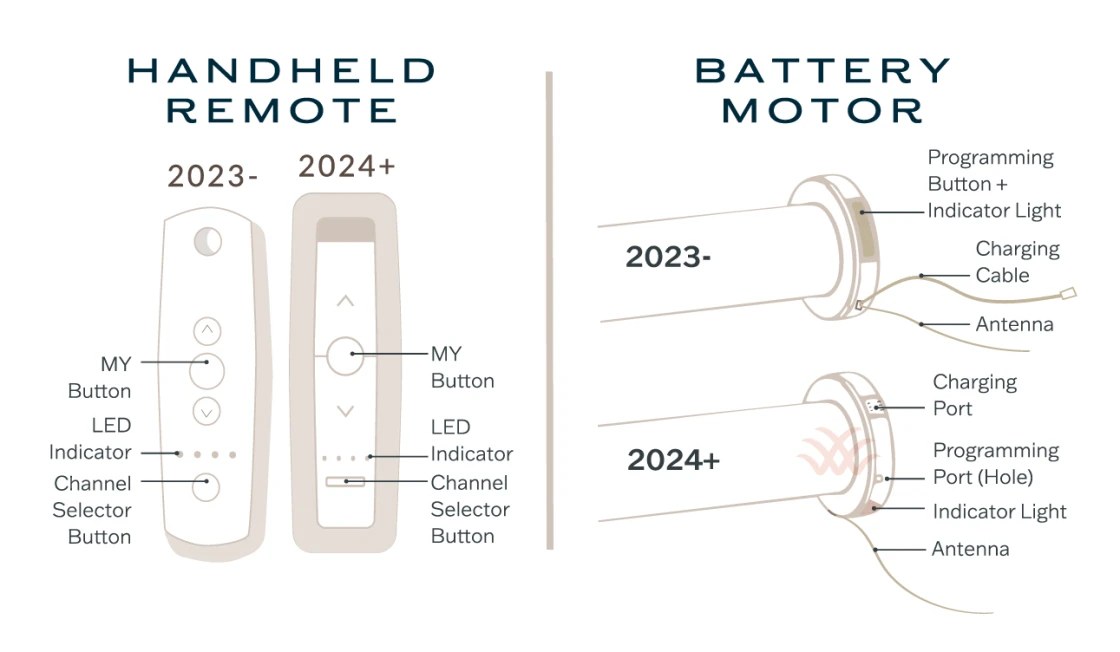
A multi-channel remote turns a bank of motorized shades into an organized system instead of a collection of individual controls. Channel 1 might operate the living room, channel 2 the bedrooms, and an “all” channel every shade at once. Programming works best when you document the shade order, pair one motor at a time, and test the upper and lower limits before creating groups.
World Wide Shades can help plan channel assignments before your shades ship. Build a motorized shade project with World Wide Shades, compare fabric swatches, or contact World Wide Shades with a window list. For a large installation, call (844) 674-2716 and ask for a room-by-room control map.
What a multi-channel remote actually controls
Most multi-channel remotes use a selector, display, or indicator lights to choose a channel, then separate up, stop, and down commands to move the selected shade or group. The remote may store one motor on channel 1, several motors on channel 2, or a group on a dedicated all-channel position. The exact buttons vary by motor family, so use the supplied manual for the button sequence and never assume that a five-channel remote programs like a fifteen-channel remote.
A remote channel is not the same thing as a Wi-Fi scene. The handheld remote can usually communicate locally by radio frequency, while an app or voice assistant may depend on a hub, bridge, or home network. Start with local control, then add smart-home features. The smart-home motorized shade setup guide explains why a reliable local fallback matters.
Before programming, World Wide Shades recommends labeling every shade by room and opening: “living room west 1,” “living room west 2,” “primary left,” and so on. Ask World Wide Shades to review the control plan if several windows are the same size and easy to confuse.
Prepare before pairing anything
Write the remote model, motor model, room name, shade position, intended channel, and desired group. Leave a column for upper and lower limit status. A simple five-shade example could be:
- Channel 1: living room west window A.
- Channel 2: living room west window B.
- Channel 3: kitchen and dining windows.
- Channel 4: primary bedroom.
- Channel 5: guest bedroom.
- All: every shade together.
If you are pairing ten shades, assign channels before standing on a ladder. A two-minute plan can prevent 20 minutes of resetting. Keep the remote within 3 to 6 feet of the motor during initial pairing unless the manufacturer specifies a different distance, and charge a rechargeable motor before setup.
A motor with a low battery may enter pairing mode but fail to save a channel. Recharge it or confirm that the hardwired supply is on. Remove objects from the sill and keep fabric, cords, tools, and hands away from the moving roll. If children or pets are present, close the work area and store the remote securely after programming. Review child-safe window treatments for broader operating safety.
Take a photo of the remote’s original channel display and read the motor’s reset instructions. A full factory reset can erase every pairing and limit, so do not use it as the first response to a single incorrect channel. World Wide Shades can help identify whether the problem is pairing, a limit, or a remote battery. Contact World Wide Shades before resetting a whole group.
A general single-shade pairing sequence
The button names differ, but most systems follow the same logic:
- Select an unused channel on the remote.
- Put one motor into programming or “learn” mode using its program button, power sequence, or approved setup command.
- Send the remote’s pairing command while the motor is in that short window.
- Press the up or down command to confirm movement.
- Select stop and verify that the shade responds only on the intended channel.
- Record the result before moving to the next motor.
Some motors jog, beep, or flash to confirm a successful pairing. A jog is not universal proof that the channel is correct; select the channel again and test the shade with other channels selected. If the shade moves on two channels, it may be paired to a group as well as an individual channel.
Keep the process sequential. Pairing two motors at once can cause both to respond and makes it difficult to know which one accepted the channel. If the manufacturer requires a brief power cycle, use the exact wait period in the manual rather than repeatedly disconnecting power. World Wide Shades can help you choose a clean channel structure.
Set and test upper and lower limits
Limits tell the motor where to stop. The upper limit should leave the shade fully raised without pulling the fabric into an unsafe position; the lower limit should place the hem bar at the desired sill, floor, or privacy point. A limit is separate from the remote’s channel assignment. A shade can be paired correctly and still stop too early because its lower limit was saved incorrectly.
After pairing each shade, run three tests:
- Raise it fully and confirm the roll clears the cassette, trim, and nearby hardware.
- Lower it to the intended position and verify the hem bar is level.
- Stop it at an intermediate position, then raise and lower it again.
If the fabric stops 2 inches above the sill, do not keep pressing down. Repeated commands can heat a motor or hide a mounting problem. Follow the model-specific limit procedure, which may involve holding a program and direction button, selecting a limit mode, or using a dedicated stop sequence. World Wide Shades can help distinguish a saved limit from an obstruction. Request setup help from World Wide Shades.
Create a room group and an all-shades group
Once every motor has a tested individual channel, create groups. A living-room group should include only the windows that need to move together. A whole-home group is useful for leaving the house or securing privacy, but it should not replace room groups. Test group commands at least twice, watching for a shade that moves in the wrong direction or stops at a different height.
Groups are most useful when the shades have a shared purpose. For example, a west-facing living room group can lower to 50% at 3:00 p.m. during summer, while a bedroom group can close at bedtime. Do not put a bathroom privacy shade in an “open at sunrise” group unless you want it to reveal the room. Compare light-filtering shade choices before assigning a common schedule.
A group command can draw more battery power than a single command because multiple motors run together. If the remote responds slowly, wait for the first movement to finish before sending another all-channel command. For hardwired systems, make sure the electrical installation is appropriate; for rechargeable systems, record where each charger is stored.
Multi-channel programming mistakes to avoid
If a new shade moves when you test an existing channel, stop and identify the overlap. Do not keep adding motors and hope the group behaves. Clear only the accidental pairing using the motor’s selective-delete function if available. A factory reset may erase limits and all channels.
Radio pairing is often less forgiving than normal operation. Metal cassettes, concrete, low batteries, and nearby wireless devices can reduce the setup range. Stand close to the motor, keep the remote pointed as instructed, and wait for the confirmation signal. If the remote controls the shade normally but will not pair, check the motor’s learn-mode timing.
A shade that goes up when you press down may have an inverted direction setting or a control assigned incorrectly. Correct direction before setting limits. Otherwise the remote may save an upper limit as a lower limit, forcing another reset.
A remote may look similar to another brand’s remote while using a different protocol. Do not use a borrowed remote to pair a customer’s motor. World Wide Shades can check compatibility before you order additional controls. Send the remote and motor details to World Wide Shades.
When to add an app or voice assistant
Use the handheld remote as the baseline. After local channels, groups, and limits work, pair the bridge or hub and assign room names that match the worksheet. Avoid naming one device “shade” and another “shades”; clear names such as “Living Room West” make voice commands safer. The motorized shades Alexa and Google Home guide covers naming and routine considerations.
An app can provide schedules, percentage positions, and scenes, but it should not be the only control. Wi-Fi changes, hub updates, and phone permissions can interrupt smart commands. World Wide Shades can help you keep a physical remote and local stop command available. Build a connected shade system with World Wide Shades or call (844) 674-2716 for a control review.
Final programming checklist
Before handing over the remote, verify the channel number, room label, up direction, stop command, lower position, upper position, group membership, and battery status for every shade. Test the all-channel command with people clear of the windows. Photograph the worksheet and store the motor manual, charger, and reset instructions together.
A well-labeled remote is easier to maintain than a “smart” system no one understands. For the room itself, compare best roller shades for living rooms before choosing a shared control group. World Wide Shades can supply a fabric and motor plan that scales from one room to a whole home. Choose fabrics in the World Wide Shades builder, order replacement swatches, or contact World Wide Shades for help with a future shade addition.
Frequently asked questions
The limit depends on the remote and motor system. Some remotes offer 5 channels, while others provide 15 or more, and a channel may control one shade or a group. Check the product documentation before planning a large installation. World Wide Shades can map rooms and groups so you do not run out of useful channels.
Both motors may have been paired to that channel, or the selected channel may be a group. Test each motor on its individual channel, review the worksheet, and use the manufacturer’s selective-unpairing procedure. Avoid a full reset until you know what will be erased.
Usually not for a new, unpaired motor. A reset may be appropriate when the motor’s pairing memory is unknown, but it can erase limits and existing remotes. Follow the motor manual and contact World Wide Shades if the shade is already installed in a working group.
Normal operation and pairing may use different timing and button sequences. The motor may not be in learn mode, the battery may be low, or the remote may be incompatible. Move within a few feet, confirm the remote battery, and repeat the exact programming sequence once before escalating.
Often, yes, when the motor system has a compatible hub or bridge. Program and test the local remote first, then add the smart-home integration with clear room and shade names. Keep the handheld remote available as a fallback. World Wide Shades can help plan the controls for a multi-room installation.
Test individual channels and the most-used groups every 3 to 6 months, plus any time you replace a battery, move a hub, or add a shade. Check limits and charger access during the same review. If a shade begins stopping early, pause operation and ask World Wide Shades for troubleshooting guidance.


