Losing a motorized shade remote is frustrating because a perfectly healthy shade can appear unusable. The solution is not always buying the first similar-looking transmitter. Remote systems differ by radio frequency, channel count, pairing method, battery, bridge, and motor generation. A replacement that fits the hand may still be incompatible with the receiver.
This guide explains what to identify, how to choose a replacement path, and how to pair it without erasing the rest of the room. World Wide Shades can help match the motor and control system; begin with the World Wide Shades builder or send a motor label through contact.
First determine how the shade is controlled
A shade may be controlled by a handheld RF remote, wall switch, phone app, smart-home hub, dry-contact interface, or several of these at once. If the app or wall switch still works, the missing handheld remote may be a convenience issue rather than an operating failure. Test the remaining control before buying anything.
Look at nearby shades. If the same remote operated several windows, replacing it may restore a whole group. If one shade has a different motor or room code, pairing a universal-looking transmitter can create confusing cross-control. World Wide Shades can document each shade and channel in a replacement plan; call (844) 674-2716 if the installation has multiple rooms.
The smart-home motorized shades setup guide explains how remotes, bridges, apps, and voice assistants fit together. Keep the local control path available even if you prefer app commands.
Find the motor and receiver identity
Search the headrail, motor cap, power lead, battery tube, bridge, and installation paperwork for a model number. A label may contain a brand, series, voltage, frequency, or date code. Photograph it without removing the shade. If the motor is hardwired, photograph the accessible power supply label rather than opening an electrical enclosure.
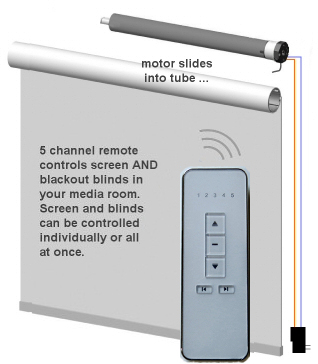
Count existing channels and note whether one button operates up, stop, and down or whether the remote uses a rotary selector, display, or room buttons. Record whether the shade responds to a single channel, a group channel, or an all-shades command.
Do not assume that “433 MHz,” “868 MHz,” or “RF” alone proves compatibility. Protocol, encryption, receiver generation, and pairing sequence also matter. Ask World Wide Shades to verify the complete path; use contact before ordering.
Four replacement options
The closest match is an original transmitter made for the motor series. It is usually the simplest option when the model is known and still supported. Confirm channel count, regional frequency, battery type, and whether a hub is required.
Some systems support a documented replacement remote or wall control. Compatibility should be stated by the shade or motor manufacturer, not inferred from a marketplace photo. World Wide Shades can help identify the correct part and control scope.
If the motor already appears in a smart-home app, the app may provide everyday control while you obtain a remote. This depends on the motor bridge, account, network, and integration. A hub is not a substitute for a compatible receiver; it cannot translate every radio protocol.
An obsolete motor, missing bridge, or unknown system can make a complete upgrade more economical than a long search for one transmitter. A new motorized shade also lets you correct fabric, mount, and channel grouping. Browse swatches while World Wide Shades evaluates the replacement.
Pairing without losing other shades
Pairing procedures vary, but many use a small program button on the motor or a power-cycle sequence followed by a remote command. The program action may affect every motor that hears it, so isolate the target shade when possible. Close nearby shades, disconnect their power only when a qualified professional says it is safe, or use the manufacturer’s channel-selection method.
Have the new remote, shade model, and instructions ready before entering pairing mode. Keep the shade visible and stop if it moves unexpectedly. Do not hold random buttons for 10 seconds because a generic sequence can erase limits or all existing remotes.
After pairing, test up, stop, down, and the correct channel. Then test the group channel and app. Write the successful sequence in the project folder. World Wide Shades can walk through the configuration via contact, and builder can capture a clean upgrade scope.
Reprogramming limits is a separate task
Remote pairing and travel-limit programming are not always the same procedure. A remote may control the motor while the shade still stops at the wrong height. Do not adjust limits until the fabric is straight, brackets are secure, and the motor manual is identified.
If the shade is wide or heavy, keep the bottom rail clear and have a second adult observe. A reset can reverse direction, erase group assignments, or make the shade travel farther than expected. If the shade will not move after pairing, use the light-filtering shades guide rather than repeating the pairing sequence.
World Wide Shades can specify a replacement remote while preserving your current limits, when the system supports that path. Call (844) 674-2716 for help with a multi-window installation.
What to do when the remote is not the real problem
If the remote indicator lights but the shade is silent, check the shade’s battery or hardwired power. If every shade in a room is silent, the bridge, supply, or breaker may be involved. If one shade responds only at close range, the receiver, radio environment, or battery may be failing.
A shade that moves in the wrong direction may have a reversed motor setting or a misassigned channel. A shade that responds intermittently may have a weak remote battery, an obstructed signal, or a hub that is offline. Note distance, indicator behavior, and which channels work.
Do not open the motor, splice low-voltage wiring, or bypass safety devices to make a remote work. A qualified installer should inspect electrical and mechanical faults. World Wide Shades can help decide whether a remote, bridge, motor, or full shade is the correct replacement.
Prevent the next lost-remote problem
Store one spare transmitter in a labeled drawer and record the model in your home-maintenance notes. Put a small label on the back of each remote with room and channel names. If the system supports app control, keep the account credentials in your password manager and document the hub location.
Use clear room names such as “Primary Bedroom East” rather than “Shade 3.” Set scenes with descriptive names and avoid an “all shades” command unless it is genuinely useful. For rentals or guest rooms, a wall control can be easier to explain than a hidden app account.
If you are replacing a chain-operated shade during the upgrade, the child-safe window treatments guide explains the benefits of cordless and motorized options. World Wide Shades can design a consistent control plan across the home; request swatches before finalizing the fabric.
FAQ: lost motorized shade remote
No. Frequency is only one compatibility factor. The receiver protocol, motor generation, channel architecture, and pairing method must match. Identify the motor and obtain a documented compatible remote.
Sometimes. If the shade has a compatible bridge or Wi-Fi motor, its app or smart-home platform may provide control. App control does not guarantee local operation during a network outage, so a backup wall or handheld control can be valuable.
It can, depending on the motor and pairing procedure. Isolate the target shade when possible and follow the exact instructions. Do not press a generic reset sequence without identifying the system.
Photograph the headrail, motor end, power supply, bridge, and any old paperwork. Note channel count and symptoms. World Wide Shades can use those details to narrow the replacement path through contact.
It can be when the motor is obsolete, the bridge is unsupported, or the fabric and hardware are already worn. Compare a complete upgrade with how much custom roller shades cost.
For a broader control comparison, read motorized shades with Alexa and Google Home and window shade color guide.
Make control dependable again
Start by identifying the motor, then choose a documented remote, bridge, or replacement shade. Pair carefully, preserve limits, and write down the successful configuration. World Wide Shades can help you make the upgrade coherent instead of piecemeal. Use the builder, order swatches, or call (844) 674-2716 through contact.


