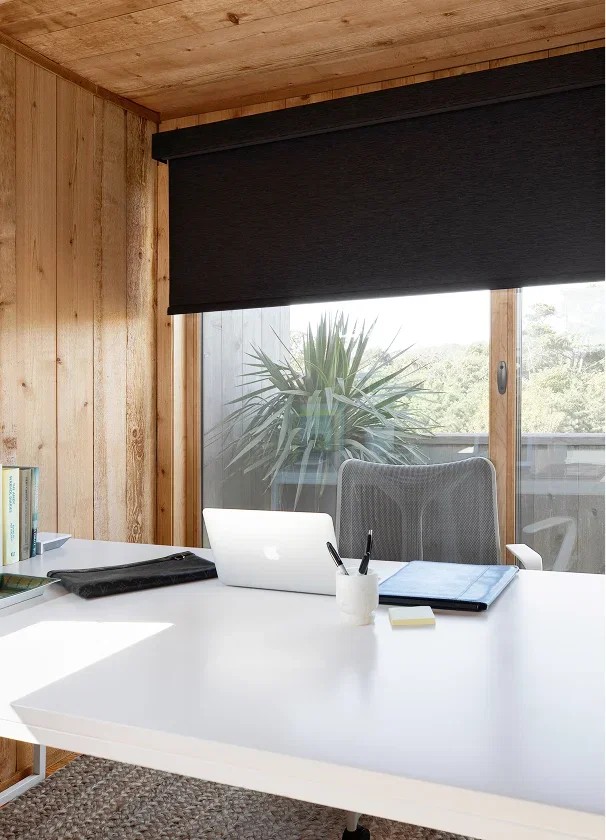
A home office can have beautiful daylight and still be uncomfortable to work in. Direct sun across a monitor creates bright reflections, a window behind the webcam turns your face into a silhouette, and a glossy desk can bounce light back into the screen. Roller shades solve these problems when they are selected for the direction of the window, the position of the desk, and the hours when calls are most frequent.
World Wide Shades helps home-office owners balance glare reduction, privacy, view, and a professional video background. Build a home-office shade plan with World Wide Shades, order fabric swatches, or contact World Wide Shades with the window direction and desk layout. Call (844) 674-2716 if a camera-facing window, corner office, or large glass door creates difficult light at more than one time of day.
Why glare appears on video calls
Glare has two separate causes. A monitor reflects bright sources into the viewer's eyes, while backlighting makes the camera reduce exposure for the window instead of the person's face. A shade may improve one problem without solving the other. For example, a dark solar screen can preserve the view and reduce direct brightness on the monitor, but a bright sky behind the camera can still make the face look dim.
Start by identifying the light path. An east-facing window can be harsh during morning meetings; a south-facing window may be bright for much of the day; a west-facing window often peaks during afternoon calls. Record the time of your most important calls and note whether the sun hits the screen, the camera lens, the wall behind you, or the floor.
The best shades for south-facing windows guide explains why exposure changes the fabric decision. Ask World Wide Shades for a directional-light review before assuming a single “office white” shade will perform the same in every room.
Position the desk before choosing the shade
The easiest glare problem to fix is a desk that faces the window directly. Whenever the room allows, place the monitor perpendicular to the glass rather than facing it or sitting with the window directly behind your head. A 90-degree relationship reduces direct reflection, though the exact result depends on monitor finish, window height, and sun angle.
If the desk cannot move, use the shade to control the brightest portion of the window rather than closing the entire opening. A roller shade can stop at 40% or 60% to block the sky while preserving a lower view. A wide window may benefit from two independently controlled shades: one over the camera background and another beside the monitor. Explore office shade planning for the logic of separate zones.
Place a small lamp or soft light in front of you, behind the camera, at roughly eye level or slightly higher. The goal is not to make the room bright; it is to give the camera a stable face exposure while the shade controls the window. Start a World Wide Shades room plan with a simple sketch showing window, desk, camera, and monitor.
Compare openness factors
Solar roller shades are often described by openness factor, the percentage of the fabric's surface occupied by small openings. Common choices include 1%, 3%, and 5%. A 1% screen blocks more direct light and offers stronger daytime privacy than a 5% screen, while a 5% screen can preserve a clearer view and a brighter room. The exact performance depends on color, glazing, orientation, and sun angle.
A darker screen can reduce visible reflections and preserve exterior contrast, but it may also look visually heavier. A lighter fabric can soften the room and coordinate with walls, yet transmit more brightness. Use the swatch against the actual monitor and camera, not only next to a paint chip. Order World Wide Shades swatches and test them at the times of your calls.
Light-filtering roller shades are another option when privacy and softer illumination matter more than an exterior view. A room-darkening shade is useful for presentations, editing, or calls with strong afternoon sun, but full closure can make a small office feel dim. Read the light-filtering shades guide and compare roller shades with Roman shades if texture and softness are also design priorities.
Control the camera background
A professional background needs stable light and intentional contrast. If the window is behind you, lower the shade enough to remove the bright rectangle from the camera's exposure while leaving some visual depth. If the window is beside you, use a position that keeps one side of the face from being much brighter than the other. If the window is in front of you, a light-filtering shade may diffuse the light while a small front lamp fills the remaining shadows.
Do not rely on virtual backgrounds to fix a lighting problem. Hair edges, glasses, and hands can flicker when the camera is separating a person from a bright window. Physical shade control gives the webcam a more stable scene. Contact World Wide Shades for a two-shade plan when the camera and monitor face different windows.
Motorization makes meeting-day control easier
A cordless manual shade is fine when the window is close and calls are occasional. Motorization becomes more useful when the window is behind the desk, the shade is wide, the top is out of reach, or the office changes position during the day. A remote or wall control lets you make a small 10% adjustment without standing up; an app or smart-home scene can lower the shade before a scheduled meeting.
Use a local remote as the primary fallback. Smart-home routines should support the workday rather than fight it. A useful office scene might set a west-facing shade to 60% at 2:30 p.m., then close it to 25% when a meeting begins. Review the smart-home motorized shades setup and Alexa and Google Home motorized shades before adding voice control.
Battery-powered shades simplify retrofits, but charging frequency depends on width, fabric, weight, and cycles. Hardwired power can make sense for a dedicated office with daily schedules. World Wide Shades can compare those options during a configuration review. Ask World Wide Shades to map your control plan before ordering a motor.
Handle privacy without making the office dark
Daytime privacy is different from nighttime privacy. A 5% or 3% screen may allow a view out while making it harder for someone outside to see detail during daylight, but when interior lights are brighter than outdoors, silhouettes can become visible. If the office faces a sidewalk or neighboring building, choose a room-darkening or layered solution for evening work.
A shade with a cassette can conceal the rolled fabric and create a cleaner camera background. Side channels or close-fitting hardware can reduce edge light when privacy or presentations matter, though they add installation requirements. Compare roller-shade valance options and read about custom shades for new construction if the office is being renovated.
Measure a home-office opening
Measure width at the top, center, and bottom; measure height on the left, center, and right. Note recess depth, trim, handles, mullions, and whether the shade will be inside or outside mounted. Record monitor height and the distance from the glass to the front edge of the desk. A 2-inch handle may determine whether a fabric hangs flat or rubs against the hardware.
For an outside mount, include enough overlap to cover the bright perimeter around the glass. For an inside mount, confirm that the headrail clears the frame and that the bottom bar will not collide with the desk. Send the details to World Wide Shades if a monitor arm, camera shelf, or floating desk limits the drop.
A practical glare-control routine
Use this five-minute test before you order:
- Open the existing treatment and turn the monitor to the brightness you normally use.
- Photograph the screen and your face from the webcam position at 9:00 a.m., noon, and 3:00 p.m.
- Lower a temporary shade, curtain, or cardboard test panel to 25%, 50%, and 75%.
- Note the position that protects the face and screen without making the room uncomfortable.
- Decide whether the shade needs one position or two independent zones.
The test separates a fabric need from a furniture need. World Wide Shades can use those observations to recommend openness, color, light control, and motorization. Start the design in the builder or call (844) 674-2716 for a work-from-home consultation.
Home-office roller shade FAQ
A 1% or 3% solar screen often gives stronger glare control than a 5% screen, while a 5% fabric can preserve more view and daylight. Direction, color, glazing, and camera placement matter, so test swatches at the call desk before choosing.
Not always. Blackout is valuable for strong direct sun, presentations, editing, or nighttime privacy, but it can make the room feel flat during ordinary work. A light-filtering or solar shade may be better for everyday calls, with a separate blackout layer for special conditions.
It can be if the window is behind the desk, wide, high, or adjusted many times daily. Manual cordless control is economical for an easy-to-reach opening. World Wide Shades can compare total cost and use rather than recommending motorization automatically.
They can greatly reduce direct brightness, but reflections also depend on monitor angle, screen finish, room lamps, and sun position. Move the monitor perpendicular to the glass and use a soft light behind the camera for best results.
Neutral, low-contrast fabrics usually create a calmer background, but the best color depends on walls, trim, exposure, and the camera's white balance. Order swatches from World Wide Shades and view them through the webcam before finalizing.
Make the office easier to work in
A good office roller shade is a lighting tool, a privacy tool, and a background-control tool. Measure the window, map the sun, position the desk, test openness factors, and choose a control method you will actually use. Build a World Wide Shades office solution, review fabrics, or contact World Wide Shades. With the right shade position, a camera-ready office can stay bright without making every call a glare-management exercise.


